






Every quantity. Every modifier.
Keep dishes, units and preparation instructions distinct.
POS INTEGRATION · KITCHEN OPERATIONS
OneKDS is a kitchen display system for restaurants. Bring supported kitchen tickets to an Android display, manage preparation and trace exceptions.
Public download: 1.4.15 · Android app in Chinese only
SaaS business workspace is planned, not yet available.
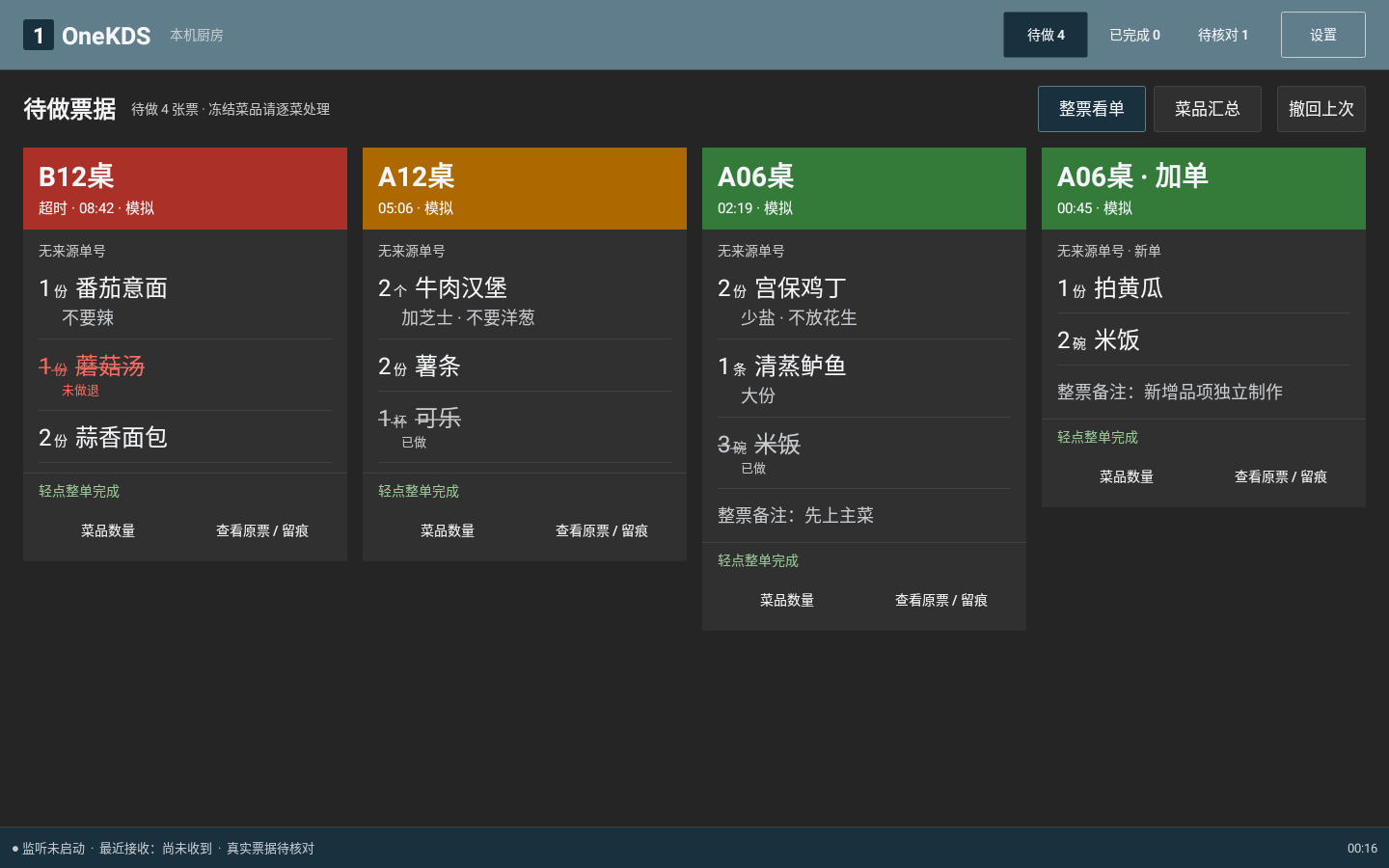
Dine-in, delivery and multiple POS systems: bring supported kitchen tickets together in OneKDS. View items, manage preparation and trace exceptions on one kitchen display.
Source examples, not verified integrations or official partnerships
Ticket collection · Preparation tracking · Waiting alerts
Confirm the connection with your POS and sample tickets.
Compatibility depends on the POS version, print output, ticket format and store network. This is not universal POS or delivery support, or direct payment integration.
Check POS compatibilityBEFORE YOU CONNECT
From supported POS output
Process supported tickets; review exceptions
See items, quantities and instructions
Retain source tickets and action records
Keep dishes, units and preparation instructions distinct.
Complete a ticket or part of it, retaining action records. A completion action is not proof of customer delivery.
Review unknown, incomplete or ambiguous tickets separately. An analysis never replaces its source record.
Current release: complete, unambiguous supported tickets can enter preparation automatically. Unknown, incomplete, suspected reprint and unclear cancellation tickets still require review.
Read the public-version setup guide03 / Android kitchen client
Keep the kitchen focused on tickets and preparation. Explore how information can fit different kitchen workflows.
See the table, dishes and modifiers together when coordinating a full meal.
Layout preview, saving and waiting thresholds are Android device settings, separate from the SaaS business workspace. Saving a setting does not send it from the cloud.
Public release 1.4.15 includes local layout and alert settings. The examples below are web simulations.
One column on narrow screens
Sample ticket · Batch 01
Mild
Regular
Sample ticket · Batch 02
Sauce on the side
No onion
Sample ticket · Batch 03
Less salt
Regular
Yellow and red thresholds are configurable on the device. This example uses 5 and 10 minutes only.
All visuals are rebuilt web examples with simulated data, not device screenshots of the current release. Changes apply only to this page, do not update a device, and do not imply automatic rules for every kitchen type.
Digital operations mean more than putting paper tickets on a screen. First preserve the work itself; then use a web workspace to explore patterns, investigate issues and review changes.
Receive and view tickets, manage preparation, see waiting alerts and configure the local display. Keep the team focused on work that needs attention.
Client capabilities and versionsBusiness statistics, issue analysis and a proactive assistant belong in the web workspace, not the kitchen client. Cloud data integration and account services are not yet available.
Explore the web conceptCentral configuration and future app access are planned directions. Current layouts and alerts are configured locally on Android, not pushed from the cloud.
SaaS web workspace · Planned
Start with a change worth checking, inspect the evidence, consider an action, then review it. Business analysis is planned for the SaaS web workspace, not the Android kitchen client.
This is a scripted demo. No live business data or cloud synchronization is connected.
The current average is 14 minutes, 4 minutes above the historical sample (+40%).
Only 4 valid current tickets and 8 historical tickets are included. The 40% difference is arithmetic for this small simulated sample, not a trend or evidence of causation.
Batch completion taps, menu mix, or preparation may affect the records. They cannot establish a staffing shortage or individual performance.
Of 6 simulated current tickets, 4 are included and 2 excluded. The baseline contains 8 valid tickets from the same Thursday window in the previous 4 weeks. Every included record, exclusion, and time boundary is listed below.
History contains 2 tickets per date at 8 and 12 minutes: 80 ÷ 8 = 10 minutes. The current total is 56 ÷ 4 = 14 minutes.
Ask the shift team whether completion taps were batched or the menu mix and preparation changed. If records are accurate, compare the same station, time window, and menu mix.
Note an investigation to revisit when new comparable data becomes available.
There is no new comparable data. Recording an action does not demonstrate improvement. Even if duration falls later, sample coverage and other changes must be checked before attributing it to an action.
No demo action recorded. Try recording one in Suggest.
Demo store / connected source A; timezone Asia/Shanghai. Both groups include valid tickets received from 18:00–20:00 and marked complete by 20:30 on that date. Timing runs from receipt to completion tap, not active cooking time. All dates and tickets are fixed simulated samples.
| Internal ID / date | Received → completed | Minutes |
|---|---|---|
| T012026-09-24 | 18:10 → 18:26 | 16 |
| T022026-09-24 | 18:20 → 18:32 | 12 |
| T032026-09-24 | 18:40 → 18:58 | 18 |
| T042026-09-24 | 19:10 → 19:20 | 10 |
| H1A2026-09-17 | 18:10 → 18:18 | 8 |
| H1B2026-09-17 | 19:10 → 19:22 | 12 |
| H2A2026-09-10 | 18:10 → 18:18 | 8 |
| H2B2026-09-10 | 19:10 → 19:22 | 12 |
| H3A2026-09-03 | 18:10 → 18:18 | 8 |
| H3B2026-09-03 | 19:10 → 19:22 | 12 |
| H4A2026-08-27 | 18:10 → 18:18 | 8 |
| H4B2026-08-27 | 19:10 → 19:22 | 12 |
Sample source ticket T01: table A08, 12 lamb skewers, mildly spicy. Simulated event log: received at 18:10, whole-ticket completion tapped at 18:26, no undo. These details only illustrate traceability.
Current exclusions: T05 (2026-09-24 19:20, awaiting review, no reliable completion time) and T06 (2026-09-24 19:25, suspected reprint). Neither enters the total or denominator; neither counts as zero minutes. The historical demo has no additional exclusions.
T01–T06 and H-prefixed IDs are demo internal identifiers, not POS order numbers. Unconnected sources, unfinished tickets, and missing completion times are outside the metric. This sample cannot represent the whole store.
Verified revenue and costs, payments, refunds, and ingredient records are missing. Profit cannot be assessed.
Follow up · Scripted answers
Choose a question to explore the limits of this demo.
No operational conclusion
This scenario lacks some sources and historical completion records. Store-wide slowdown cannot be assessed. Missing data is not zero, and no percentage change is produced.
Check source coverage, timestamps, and completion records, then collect comparable samples. Cannot assess improvement or profit.
Actions exist only in this page’s memory and disappear on refresh. No real tasks, notifications, or data uploads are created.
A KDS (Kitchen Display System) displays kitchen tickets and preparation progress on a screen. OneKDS supports restaurant kitchen execution; it does not replace POS checkout or payment systems.
OneKDS Android kitchen display system for supported local kitchen tickets, exception review, preparation, layout and alert settings, and source tracing.
Public-release facts. Verify against: release notes · package and checksum · Android product details
OneKDS is designed for multiple POS integrations, but the brand alone does not establish compatibility. Confirm the version, output, ticket format and network, then test real tickets. Image-based and unknown formats are not assumed to work.
View the answerPlanned analytics and the assistant belong in the SaaS web workspace, not the Android kitchen client. The client focuses on tickets, preparation and local settings. The homepage uses simulated data with no AI connection. Cloud integration, account services, metrics and availability will be announced separately.
View the answerThe website supports Simplified Chinese and English, with more languages planned. The initial Android app is Chinese only; English instructions include the Chinese controls. Account services are not open. The planned registration defaults are phone in China and email overseas, independently of website language.
View the answerConfirm compatibility, then verify your store’s workflow.
Downloads & device requirementsRead the integration guideExplore the one-month activation trial planTrial release pending; registration and activation are not open.
Referral commissions · Wholesale resale
Explore partnership options